Filter bags do not come with an expiration date. The same bag can last a short time in a hot, abrasive, or damp process and much longer on dry, easy dust. Instead of changing bags on a fixed calendar, the better approach is to watch how the collector behaves, inspect the bags when the signs point to trouble, and plan the change-out before emissions or airflow problems force an unplanned shutdown. This guide covers the warning signs, a practical inspection checklist, and tips for getting the most out of the new set.
Watch the Differential Pressure Trend
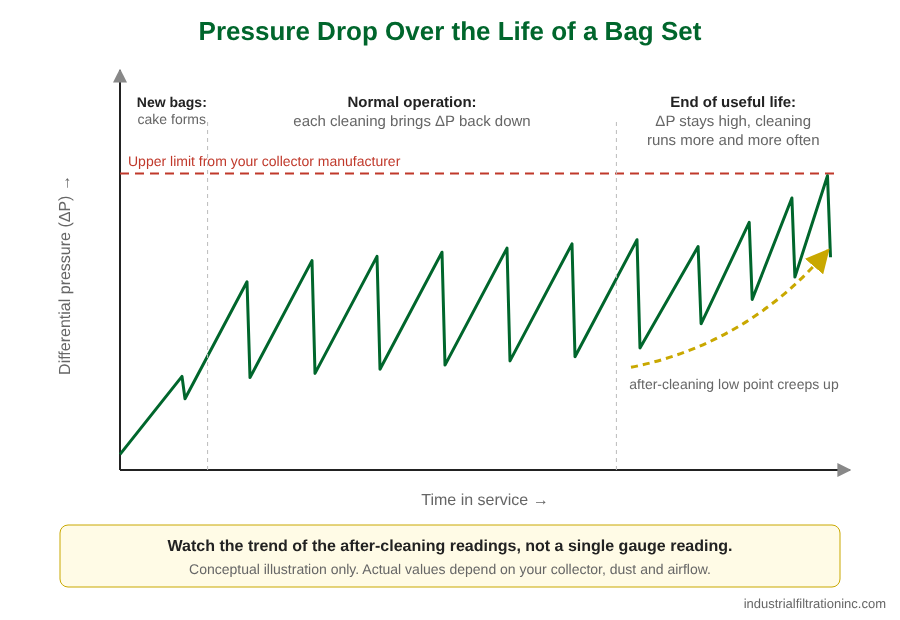
The differential pressure (ΔP) gauge across the tubesheet is the single most useful tool for judging bag condition. Brand-new bags start with low resistance. As a stable dust cake forms, ΔP rises and then settles into a regular pattern: it climbs as dust builds up and drops back after each cleaning cycle.
The reading to watch is the low point after cleaning. When bags are healthy, that low point stays fairly steady for a long time. When the media starts to blind, the low point creeps upward, cleaning brings it down less and less, and the controller fires more often to keep up. Once ΔP sits near the upper end of your collector manufacturer’s recommended range even right after cleaning, the bags are usually near the end of their useful life.
Log ΔP at the same time and under similar operating conditions each shift. A simple trend line gives far more warning than an occasional glance at the gauge.
Other Signs Your Bags Need Attention
- Visible emissions or puffing. A puff at the stack or exhaust that lines up with a cleaning pulse often points to a leaking bag in the row that just fired. Steady haze can mean many bags are leaking or the media is worn thin.
- Dust on the clean side. Dust on top of the tubesheet, in the clean-air plenum, or inside the outlet duct means something is letting dust through. A ring of dust around one hole usually marks a damaged bag or a poorly seated top.
- Holes, abrasion, or burn marks. Look for pinholes, scorch marks from sparks, worn patches near the inlet, and wear lines along the cage wires.
- Stiff, heavy, or blinded fabric. Bags that feel boardy, crusted, oily, or noticeably heavier than new are likely blinded. Moisture, condensation, and sticky or oily dust are common causes.
- Shorter cleaning intervals. If an on-demand controller is pulsing much more often than it used to, or compressed air use has gone up, the bags may no longer release dust well.
- Lost suction at the pickup points. Weaker capture at hoods and pickups can come from high ΔP across tired bags, though fan and duct problems cause it too.
Rule Out Other Causes First
High pressure drop is not always a bag problem. Before ordering a full set, check the things that make good bags look bad:
- Pulse valves that leak, fire weakly, or do not fire at all. See our guide to pulse valve diaphragm repair kits, and browse diaphragm repair kits if a valve needs rebuilding.
- Low or unstable compressed air header pressure, or wet, oily air.
- Controller timing or on-demand settings that were changed.
- A full hopper, or a rotary valve or screw conveyor that is not discharging.
- Plugged or leaking gauge lines, or a gauge that needs calibration.
- Changes in airflow, process temperature, or dust loading.
Likewise, dust on the clean side is sometimes a seating problem, a cracked weld, or a bad door gasket rather than a failed bag.
Filter Bag Inspection Checklist
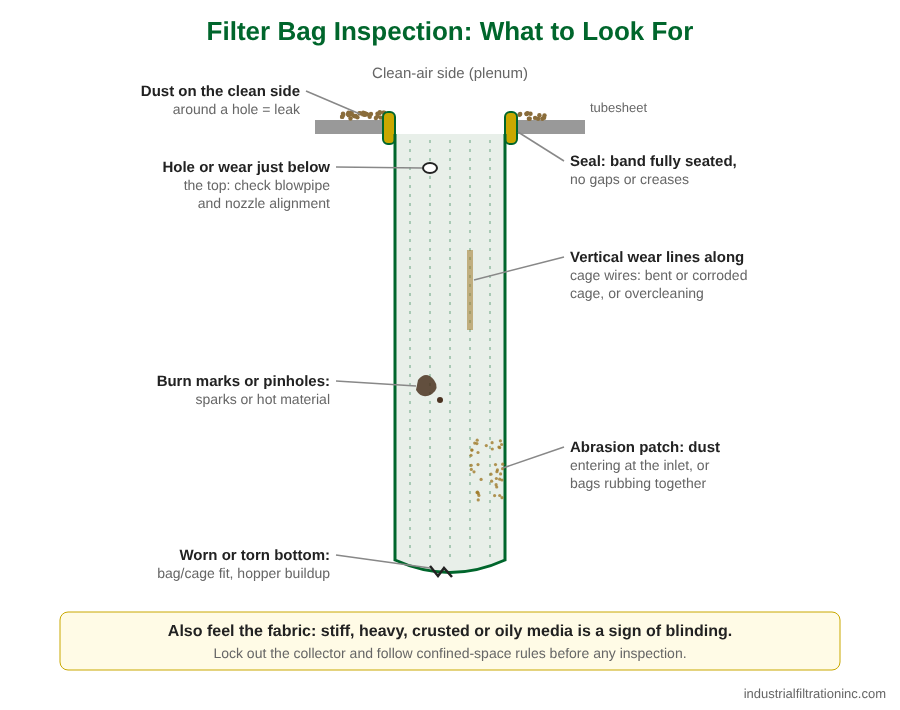
Lock out the collector and follow your plant’s confined-space and PPE rules before opening doors or entering the plenum. Then work through this list:
- Clean-air side: look for dust on the tubesheet and plenum walls, and note which holes have dust around them.
- Seal: check that every bag top is fully seated, with no gaps, folds, or crushed snap bands.
- Bag condition: pull a few bags from different areas, including near the inlet, and check for holes, thinning, abrasion, burn marks, and wear lines from the cage.
- Feel and weight: compare a used bag to a new one. Stiffness, crusting, or extra weight suggests blinding.
- Bottoms: look for worn or torn bottoms, which can point to bags that are too long for the cage, bags swinging into each other, or dust building up in the hopper.
- Cages: check for bent, corroded, or rough wires and damaged bottom pans.
- Cleaning system: confirm blowpipes are aligned over the bag centers and nozzles or holes are not damaged.
- Record it: note the location and type of every failure. A pattern, such as all failures near the inlet, usually points to a root cause worth fixing.
Replace All Bags or Just the Failed Ones?
There is no single right answer, but these points help you decide:
- Spot replacement makes sense when a few bags fail early from a specific cause, such as a spark event or a bent cage, and the rest of the set is relatively new with a healthy ΔP trend.
- A full change-out makes sense when failures are spread across the collector, ΔP stays high after cleaning, or the set is old enough that more failures are likely soon.
- Mixed sets behave unevenly. New bags have less resistance, so more air flows through them. They load quickly and may wear faster than the bags around them.
- Downtime counts. If getting into the collector is costly, replacing the whole set during a planned shutdown can be cheaper than repeated entries.
Keeping a few spare bags on the shelf lets you replace a handful to stay running, then schedule a full change-out.
Tips for the Change-Out
- Inspect every cage. Replace cages that are bent, corroded, or have sharp burrs or broken welds. A damaged cage will cut a new bag.
- Check the tubesheet or cell plate. Clean each hole and look for dents, out-of-round holes, cracks, or buildup that will keep a snap band from seating. On clamp-style collectors, check the thimbles and use clamps in good condition.
- Seat every top fully. For snap bands, run a finger around each one to confirm both beads are seated. See our guide on how to measure a replacement filter bag or cartridge if the fit seems off.
- Handle new bags carefully. Keep them in their packaging until installation, and avoid dragging them across sharp edges or rough tubesheets.
- Precoat or seed if your process calls for it. In applications with sticky, oily, or damp dust, many operators coat new bags with a dry precoat material before introducing process dust, so the first cake protects the media. Follow the collector manufacturer’s guidance on material and method.
- Bring the system up gently. Avoid running new bags hard before a dust cake forms, and confirm cleaning settings follow the collector or bag manufacturer’s recommendations for startup.
- Check for leaks. Some plants use a fluorescent leak-detection powder after a change-out to find bags that are not seated.
- Start a new log. Record the install date, media, and the starting ΔP. That baseline makes the next decision much easier.
If bags keep failing early, the replacement media may not suit the process. Our guide to choosing dust collector filter bag media covers temperature, moisture, and chemical limits.
Need Help?
Industrial Filtration has supplied dust collector filter bags and related parts to industry since 1956. If you are planning a change-out or trying to figure out why bags are failing early, call us at 562-436-4228 or email info@industrialfiltrationinc.com. Send us your collector make and model, bag size, and what you are seeing, and we will help you find the right replacement.
